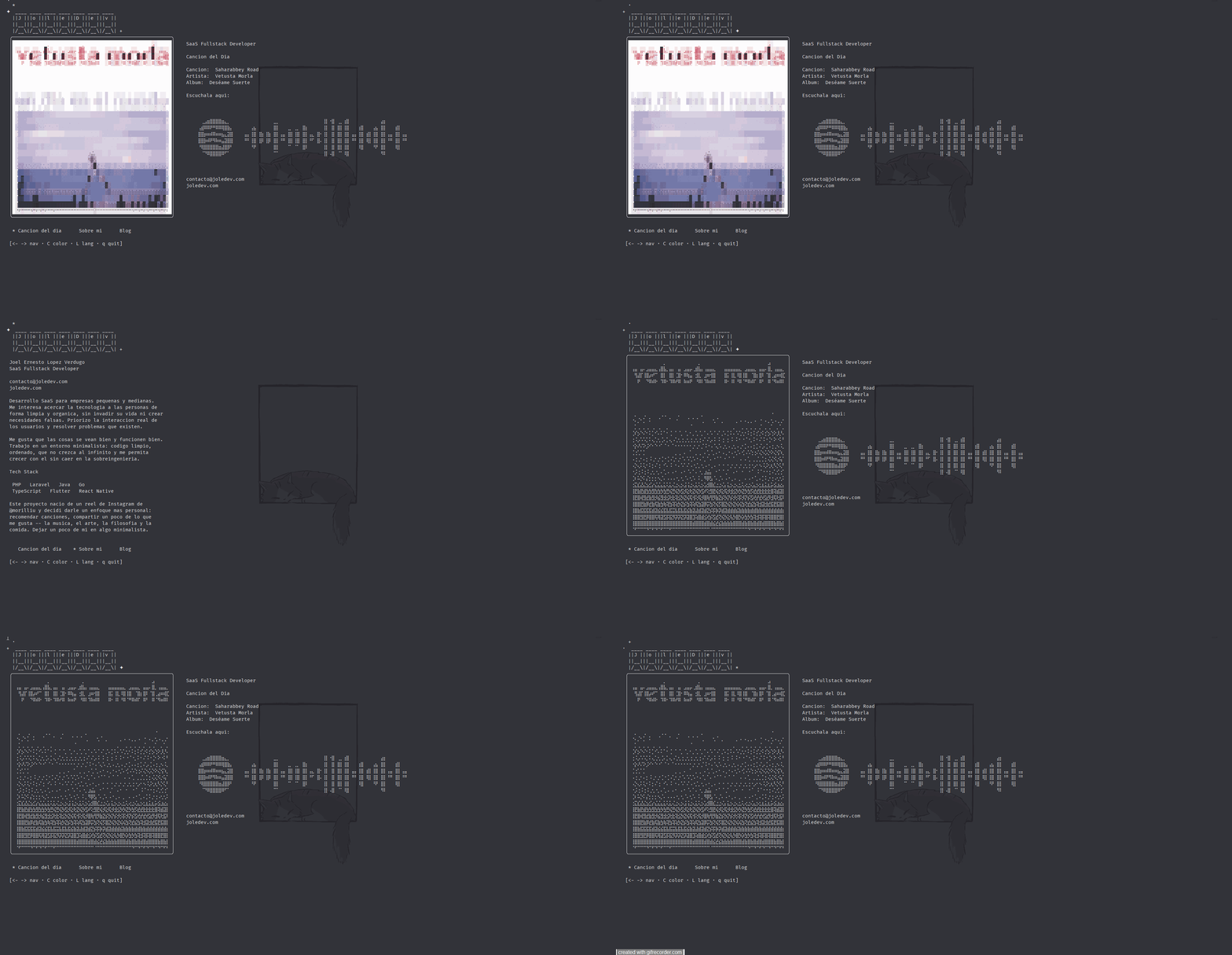
ssh.joledev.com — Terminal Portfolio
A personal portfolio accessible via SSH with an interactive TUI, Unicode braille art, daily song from Spotify, and an integrated blog.
Tech Stack
The idea
It all started with an Instagram reel from @morilliu showcasing a portfolio accessible via SSH. I loved the concept, but instead of replicating a traditional portfolio, I wanted to design something more personal: a space of my own for my ideas, where I could share music, thoughts, and projects from the terminal.
The result is ssh.joledev.com — a custom SSH server that instead of giving you a shell, greets you with an interactive interface.
Architecture
The project has an intentionally simple architecture — a single Go binary that does everything:
ssh ssh.joledev.comEach SSH connection creates an isolated TUI instance. No shell, no filesystem, no escalation — just the app.
The SSH server
The entry point is surprisingly simple. Wish handles the entire SSH handshake and spawns a new Bubbletea program for each session:
s, err := wish.NewServer(
    wish.WithAddress(fmt.Sprintf("%s:%s", host, port)),
    wish.WithHostKeyPath(keyPath),
    wish.WithMiddleware(
        bubbletea.Middleware(func(s ssh.Session) (tea.Model, []tea.ProgramOption) {
            m := tui.NewModel(songsPath, postsDir)
            return m, []tea.ProgramOption{tea.WithAltScreen()}
        }),
    ),
)
WithAltScreen() makes the terminal enter fullscreen mode — like when you open vim or htop. When the user exits, the terminal restores its previous state.
The TUI state
The Bubbletea model holds all session state. Each user gets their own instance:
type Model struct {
    Lang         Lang      // ES or EN
    Section      Section   // SectionSong, SectionAbout, SectionBlog
    Width        int       // User's terminal width
    Height       int       // User's terminal height
    Songs        []data.Song
    Posts        []data.Post
    TodaySong    data.Song
    CoverMono    string    // B&W braille album cover
    CoverColor   string    // ANSI color braille cover
    ColorMode    bool      // Toggle between B&W and color
    SpotifyCode  string    // Scannable barcode
    Frame        int       // Border animation (tick every 400ms)
}
Song of the day
I wanted every visitor to see the same song each day, but a different one every day. The solution: a SHA-256 hash of the current date as a deterministic seed:
func SongOfTheDay(songs []Song) Song {
    loc, _ := time.LoadLocation("America/Tijuana")
    now := time.Now().In(loc)
    dateStr := now.Format("2006-01-02")

    h := sha256.Sum256([]byte(dateStr))
    seed := int64(binary.BigEndian.Uint64(h[:8]))
    r := rand.New(rand.NewSource(seed))
    idx := r.Intn(len(songs))

    return songs[idx]
}
Same date, same hash, same seed, same song. No matter how many times you connect or from where — the result is identical for everyone.
The catalog: 578+ songs with no API key
To populate the catalog, I wrote a Python script that scrapes Spotify’s public embed page. No tokens, no OAuth, no app registration:
def scrape_spotify_playlist(playlist_url: str) -> list[dict]:
    playlist_id = re.search(r"playlist/([a-zA-Z0-9]+)", playlist_url).group(1)
    embed_url = f"https://open.spotify.com/embed/playlist/{playlist_id}"

    # Spotify embeds the data as JSON in the HTML
    html = urllib.request.urlopen(req, timeout=15).read().decode("utf-8")
    json_match = re.search(
        r'<script id="__NEXT_DATA__" type="application/json">(.*?)</script>',
        html
    )
    data = json.loads(json_match.group(1))
    track_list = data["props"]["pageProps"]["state"]["data"]["entity"]["trackList"]
The trick is that Spotify’s embed endpoint renders HTML with __NEXT_DATA__ containing all song info as JSON.
Rendering images in braille
This was the biggest challenge. Terminals don’t support images. The solution: Unicode braille art.
Why braille over ASCII?
Each braille character encodes a 2x4 pixel grid (8 dots), while traditional ASCII art only has 1 pixel per character. That’s 8x the resolution in the same space:
| Method | Resolution | Characters |
|---|---|---|
| ASCII art | 1x1 | ~70 gray levels |
| Block Unicode | 2x2 | 4 combinations |
| Braille Unicode | 2x4 | 256 combinations |
The complete pipeline
The braille mapping
Each Unicode braille character has a base codepoint of U+2800 plus bits for each active dot:
const brailleBase = 0x2800

var dotMap = [8][3]int{
    {0, 0, 0x01}, {1, 0, 0x08},  // Row 0: bit 0 and bit 3
    {0, 1, 0x02}, {1, 1, 0x10},  // Row 1: bit 1 and bit 4
    {0, 2, 0x04}, {1, 2, 0x20},  // Row 2: bit 2 and bit 5
    {0, 3, 0x40}, {1, 3, 0x80},  // Row 3: bit 6 and bit 7
}

// Result: rune(0x2800 + code)
// Example: all dots active = 0x2800 + 0xFF = ⣿
Floyd-Steinberg dithering
The classic error diffusion algorithm. For each pixel, it decides black or white and distributes the error to neighbors:
func dither(gray [][]float64, w, h int) {
    for y := 0; y < h; y++ {
        for x := 0; x < w; x++ {
            old := gray[y][x]
            newVal := 0.0
            if old >= 128 { newVal = 255 }
            gray[y][x] = newVal
            err := old - newVal

            if x+1 < w             { gray[y][x+1]   += err * 7/16 }
            if y+1 < h && x-1 >= 0 { gray[y+1][x-1] += err * 3/16 }
            if y+1 < h             { gray[y+1][x]   += err * 5/16 }
            if y+1 < h && x+1 < w  { gray[y+1][x+1] += err * 1/16 }
        }
    }
}
Color mode: ANSI true-color
Besides B&W, there’s a color mode using 24-bit ANSI escape sequences. For each braille character, active (foreground) and inactive (background) pixel colors are averaged:
// Foreground + Background in a single character
fmt.Sprintf("\033[38;2;%d;%d;%d;48;2;%d;%d;%dm%c\033[0m",
    fr, fg, fb,  // Text color (active dots)
    br, bgg, bb, // Background color (inactive dots)
    char,        // The braille character
)
The scannable Spotify Code
The Spotify Code is the barcode you scan with the Spotify app. Rendering it in braille needs geometric precision — if the edges aren’t sharp, the scan fails.
The solution: unsharp mask instead of dithering:
func spotifyCodeToBraille(img image.Image, width int) string {
    gray := resizeGray(img, pixW, pixH)
    enhanceContrast(gray, pixW, pixH, 1.5)
    sharpen(gray, pixW, pixH, 2.0) // Unsharp mask 2.0x

    // Hard threshold instead of Floyd-Steinberg
    for y := 0; y < pixH; y++ {
        for x := 0; x < pixW; x++ {
            if gray[y][x] < 128 {
                gray[y][x] = 0
            } else {
                gray[y][x] = 255
            }
        }
    }
    // ... braille mapping same as album covers
}
Controls
| Key | Action |
|---|---|
← → | Navigate between sections |
↑ ↓ j k | Move cursor in blog |
Enter | Open selected post |
Esc | Close post / Exit |
C | Toggle color mode |
L | Toggle language (ES / EN) |
R | Retry album cover loading |
q | Quit |
Deploy and security
The service runs with systemd hardening:
[Service]
User=sshjoledev
NoNewPrivileges=true
ProtectSystem=strict
ProtectHome=true
PrivateTmp=true
RestrictSUIDSGID=true
The server doesn’t expose a shell, doesn’t accept files, doesn’t execute external code, and doesn’t persist user data. If there’s no attack surface, there’s nothing to defend.
My workflow
- Music: I add playlists on Spotify, run
python scripts/scrape_playlist.py "url1" "url2"and the catalog updates with deduplication - Blog: I create a
.mdinposts/es/with title and date — the loader picks it up on the next deploy - Deploy:
git pushand in ~60 seconds the change is live
The entire project is ~2,000 lines of Go and a ~15MB binary. No database, no cache, no CDN — just a binary and a text file with songs.